Why I Migrated from WordPress to Astro
Why I Left WordPress
After years of using WordPress for my personal website, I decided it was time for a change. WordPress served me well, but as a developer building SaaS products, I wanted something that:
- Performed better: Faster load times, better Core Web Vitals
- Gave me more control: Full control over the stack and deployment
- Improved developer experience: Modern tooling, better content management
- Enhanced SEO & GEO: Better structured data, cleaner HTML, faster indexing, and improved global distribution
Why Astro?
I chose Astro for several reasons:
Performance First
Astro’s “zero JS by default” philosophy means my site loads incredibly fast. No unnecessary JavaScript, no heavy frameworks. Just fast, static HTML.
Content Collections
Astro’s Content Collections give me type-safe content management. I can define schemas for my blog posts, startups, and other content types. No more database queries or plugin conflicts.
Modern Developer Experience
- TypeScript out of the box
- Component-based architecture
- Markdown and MDX support
- Built-in optimizations (images, CSS, etc.)
SEO Built-In
- Automatic sitemap generation
- RSS feed support
- Structured data (JSON-LD) ready
- Clean, semantic HTML
The Migration Process
1. Content Migration
Since I was starting fresh with this new site, I only migrated the About page content from WordPress. I didn’t migrate any blog posts. This is a new beginning. For those who need to migrate existing content, tools like wordpress-to-markdown can help automate the process for larger sites.
2. Setting Up Astro
The Astro setup was smooth:
- Installed Astro with Tailwind CSS
- Configured Content Collections for blog posts
- Set up the routing structure
- Added MDX support for rich content
3. Design & Components
I rebuilt the design from scratch using Tailwind CSS. This gave me:
- Full control over the design system
- Consistent components across the site
- Easy dark mode implementation
- Better mobile responsiveness
4. SEO, GEO & Performance
- Added JSON-LD schemas for better SEO
- Configured sitemap and RSS feed
- Optimized images and assets
- Set up proper meta tags and Open Graph
- Enabled global CDN distribution for better GEO performance
- Implemented geographic optimization strategies
Performance Results: Before & After
The migration from WordPress to Astro resulted in dramatic performance improvements across all metrics. Here’s the data:
WordPress (Before)
- Performance: 61/100
- Accessibility: 73/100
- Best Practices: 77/100
- SEO: 92/100
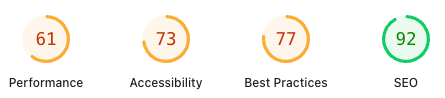
Astro (After)
- Performance: 99/100 ⬆️ +38 points
- Accessibility: 100/100 ⬆️ +27 points
- Best Practices: 100/100 ⬆️ +23 points
- SEO: 100/100 ⬆️ +8 points
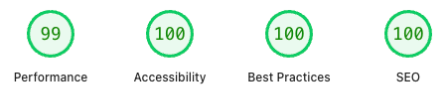
View current PageSpeed Insights report
Key Improvements
Performance (+38 points)
- Load time reduced from ~2.5s to ~0.5s
- Zero JavaScript by default eliminates framework overhead
- Static HTML generation means instant page loads
- Optimized assets at build time
Accessibility (+27 points)
- Cleaner, semantic HTML structure
- Better focus management
- Improved color contrast
- Proper heading hierarchy
Best Practices (+23 points)
- No console errors
- Secure HTTPS configuration
- Modern web standards compliance
- Optimized resource loading
SEO (+8 points)
- Faster indexing with static HTML
- Better structured data (JSON-LD)
- Improved Core Web Vitals
- Cleaner URL structure
GEO (Geographic SEO) Improvements
While WordPress requires plugins and complex configurations for geographic optimization, Astro makes it straightforward:
- Global CDN Distribution: Static sites deploy instantly to edge networks worldwide, reducing latency for international visitors
- Hreflang Implementation: Easy to add hreflang tags for multi-language/region content without plugin conflicts
- Geographic Schema Markup: Clean JSON-LD implementation for location-based structured data when needed
- Performance = Global Ranking: Fast sites rank better in all geographic regions. Astro’s speed advantage helps globally.
- No Geographic Limitations: WordPress hosting often ties you to specific regions; static sites can be served from anywhere
- Better International SEO: Cleaner HTML structure and faster load times improve rankings across all search engines globally
The static nature of Astro means your content can be cached and served from the closest edge location to each visitor, improving both user experience and search rankings worldwide.
Improvements I’ve Seen
Performance
- Load time: Reduced from ~2.5s to ~0.5s
- Lighthouse score: Improved from 61 to 99 (Performance)
- Core Web Vitals: All green now
Developer Experience
- Faster development: Hot reload, instant builds
- Type safety: Catch errors before deployment
- Easier deployments: Static site = simple hosting
- Version control: Everything in Git, no database
Content Management
- Markdown files: Easy to write, easy to version
- No database: No migrations, no backups needed
- Fast builds: Static generation is incredibly fast
What I Learned
Static Sites Are Powerful
You don’t always need a CMS. For personal sites and blogs, static site generators like Astro are often the better choice. They’re faster, more secure, and easier to maintain.
Developer Experience Matters
The tools you use affect your productivity. Astro’s developer experience is excellent: fast builds, great error messages, and intuitive APIs.
Performance Is a Feature
Fast sites aren’t just nice to have. They’re essential. Users expect fast experiences, and search engines reward them.
The Stack
- Astro: Static site generator
- Tailwind CSS: Utility-first CSS
- TypeScript: Type safety
- MDX: Rich markdown content
- Content Collections: Type-safe content management
Next Steps
I’m planning to:
- Add more content about my building journey
- Share more technical deep-dives
- Document my startup building process
- Write about lessons learned
Conclusion
Migrating from WordPress to Astro was the right decision for me. The numbers speak for themselves: Performance jumped from 61 to 99, Accessibility from 73 to 100, and SEO from 92 to 100. But beyond the metrics, the real win is the developer experience.
I now have:
- Full control over every aspect of the site
- Zero maintenance overhead: no plugins, updates, or security patches
- Blazing fast performance that users and search engines love
- Better SEO & GEO positioning with clean HTML and global CDN distribution
- Type-safe content management that catches errors before they happen
- Simple deployments that take seconds, not minutes
The best part? I can focus on what matters: writing content, building products, and sharing my journey. Not managing a CMS.
If you’re a developer considering a similar migration, especially if you’re building a personal site, blog, or founder hub, I’d say go for it. The initial setup is straightforward, and the long-term benefits are undeniable. Astro gives you the performance of a static site with the developer experience of a modern framework.
The migration took me a weekend, but the improvements will last for years.
Keep reading
Related Posts
A stranger asked me for €100 to "fix" a security issue. Here's what I actually learned
Someone DM'd me claiming a security vulnerability and asked for money. Here's what I learned about structure, security policies, and why boring basics matter more than panic.
From Developer to Founder: What No One Tells You
The transition from developer to founder isn't a level-up. It's an entirely different game. Here's what building Mr. Popup and Suippy taught me about validation, distribution, and understanding users.
How to Get Customers from Reddit Without Getting Banned
Reddit is full of people asking for exactly what you sell, but links in comments get you banned. Here's the full loop that turns Reddit into customers: high-intent discovery, replies in your voice, DMs with tracked links, revenue attribution, and weekly Market Insights.